The useful takeaway
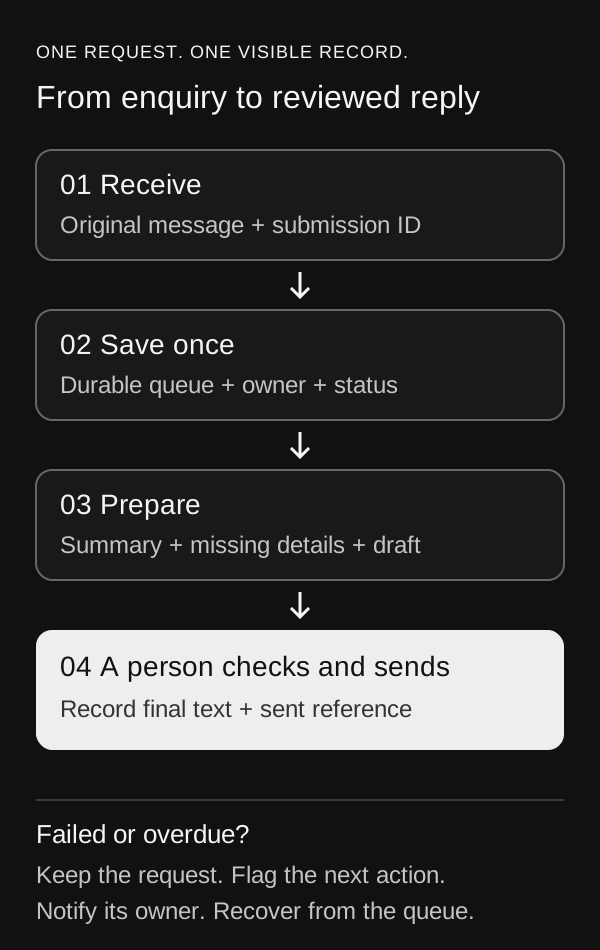
Save the request first, give it an owner, and make every failed or unfinished handoff visible. Add AI where it helps a person respond.
An enquiry arrives through your website. Someone copies it into a spreadsheet, reads the message, looks for missing details and writes a reply. On a busy day, the request can sit in an inbox because everyone assumes someone else is handling it. The first automation to build is a dependable queue with a clear next action.
This guide develops the enquiry-preparation idea from our earlier workflow overview. It is a proposed design for a small service business, with an illustrative request and review card. It is not a client case study or a description of a completed PraoAI customer system. You can implement the pattern with a workflow tool, a database or CRM, and your existing inbox.
1. Prepare one intake route and one queue
Begin with one website form. You need access to its submission records or authenticated event delivery, a durable destination, a named reviewer and a backup owner. Check that your chosen tools can create and update records and that their permissions fit the data you will handle. A spreadsheet can support a small manual pilot; a production queue needs reliable uniqueness and status controls.
Keep the original message, contact details, submission identifier and received time. Add fields for status, owner, review deadline, draft version, last error and a link to the source. Choose a response target your team can actually staff, including its timezone and business hours. An internal deadline should not quietly become a customer-facing promise.
2. Save the request before generating anything
Persist a validated submission before calling a model or sending an internal notification. If the form already stores submissions, treat that record as the recovery source. If your endpoint is the only receiver, return success only after durable storage succeeds. A notification failure must leave an identifiable request in the queue, not erase it.
Use the form’s stable submission ID as the deduplication key, namespaced by intake source. Enforce uniqueness in storage so two simultaneous deliveries cannot create two requests. For example, PostgreSQL supports conflict handling against a unique constraint or index; the appropriate action can retain the existing row rather than insert a duplicate. This storage mechanism does not, by itself, prevent duplicate emails.[1]
A retry of the same event should find the existing request and resume only unfinished work. A genuinely new submission from the same email address should remain a separate request. Do not overwrite an approved reply or reset a completed status when the original event arrives again.
3. Prepare a review card with a bounded AI step
Use ordinary rules for required fields and routing. Ask AI only to summarize the message, identify unanswered questions and draft a response using an approved service description. Give it the request and the minimum reference material needed. Treat instructions inside the submitted message as customer content, not permission to change the workflow, fetch links or use tools.
An illustrative input is: ‘We copy website orders into our inventory sheet every afternoon. Can you help connect them? We use an online store and a spreadsheet.’ The output below preserves the uncertainty instead of inventing the platform, budget or deadline. A reviewer should be able to compare every factual statement with the original message.
- Request: DEMO-1042. Status: needs review. Owner: the designated intake reviewer. Source: link to the saved submission.
- Summary: wants to reduce manual transfer of website orders into an inventory spreadsheet.
- Missing information: store platform, spreadsheet tool, transfer frequency and fields to synchronize. Budget and desired completion date were not supplied.
- Suggested reply: ‘Thanks for explaining the order-entry task. Which store platform and spreadsheet tool do you use, and which fields need to move between them? That will help us scope a useful first step.’
- Review action: edit and send manually, request more internal context, or reject the draft. No price or delivery commitment has been added.
4. Make review a separate, recorded action
For the first version, the reviewer sends the final reply from the existing inbox and marks the queue item with the sent time and message reference. The AI step has no send permission. Show the original message beside the draft, verify the recipient, and record the exact final text. A later edit should create a new version rather than silently change what was approved.
If you later add automated sending, require approval of the specific recipient and message version immediately before that action. n8n, for example, supports human review on selected AI tools: the workflow pauses, presents the proposed tool input and executes or cancels according to the reviewer’s decision. Configure and test the actual tool connection; telling a model to ask permission is not an equivalent control.[2]
Leave unanswered approvals pending and escalate them to the backup owner after the agreed deadline. Expiry or silence must not count as approval. If a send result is uncertain, check the provider’s message record before retrying; a timeout does not establish that nothing was delivered.
5. Give exceptions somewhere visible to go
Create explicit states such as received, needs review, needs information, completed and failed. If the model is unavailable, keep the original request available for a manual response. If a CRM update fails, preserve the local record and the failed step. Never mark an item completed merely because the workflow reached its final node.
In n8n, an error workflow starts with Error Trigger and is selected in the main workflow’s settings. It can notify an operator when an execution fails. The documentation also describes Stop And Error for deliberately failing a run when a required condition is not met. Route alerts to a channel the owner monitors, while retaining the queue record as the source of truth.[3]
Add a scheduled check for overdue items as well as execution-error alerts. An approval that nobody answers may not throw an error. Test duplicate delivery, a blank message, missing contact details, an unavailable model, a failed destination and an absent reviewer. Restrict attachments and unknown links in the first version; expand only when handling and review are defined.
6. Measure the whole handoff before expanding
Run a small pilot with permission to use the selected records, beginning with synthetic examples. Compare manual handling with the assisted queue on similar requests. Track total handling time, factual corrections, time to first human response, duplicate records and overdue items. Include the reviewer’s work and failure recovery, not only model generation time.
For illustration, twenty requests that each take six minutes manually require 120 minutes. If assisted preparation and review take four minutes each, they require 80 minutes: a potential 40-minute difference before setup, maintenance and exception work. These are hypothetical numbers, not observed savings or a forecast for your business.
Budget separately for workflow hosting or executions, model usage, storage, integration setup and ongoing ownership. Exact cost depends on your tools, volume and access requirements. Begin with one intake route and manual sending. Expand only when requests remain recoverable, the reviewer finds the drafts useful and the total effort justifies maintaining the workflow.
Sources & further reading
Sources reviewed October 19, 2026. Examples and recommendations are PraoAI Labs’ analysis; capabilities and services may change.
- INSERT: conflict handling and unique constraintsPostgreSQL documentation · reviewed October 19, 2026
- Human-in-the-loop for toolsn8n documentation · reviewed October 19, 2026
- Handle errors gracefullyn8n documentation · reviewed October 19, 2026
- Five everyday workflows worth automating firstPraoAI Labs · related guide
- AI this week: document review, forecasting and stronger scrutinyPraoAI Labs · evaluation background
Put the idea to work.
We can help turn a workflow or product idea into a clear scope and a useful first version.
Explore workflow & systems integration